How to sort iPhone photos into folders on a Windows PC
The iPhone keeps photos in one long camera roll, and Windows imports them the same way: a single folder, or one folder per month, full of IMG_ files. If you want them in folders by trip, by day or by place, that part is up to you.
This guide gets the photos onto your PC with their positions intact, sorts out the HEIC question, and then sorts them into one folder per place.
Before you start: make sure the iPhone records where
The position is written into each photo when it is taken, but only if the Camera may use location. Check Settings → Privacy & Security → Location Services → Camera and set it to While Using the App. Photos taken while it was off have no position. You can give them one by hand later, but it's easier to have the phone record it.
Step 1: copy the photos to your PC
There are two common ways. Both keep each photo's position.
With a cable (Windows Photos app)
- Connect the iPhone with a USB cable and unlock it.
- If the phone asks whether to trust this computer, tap Trust and enter your passcode.
- Open the Photos app on Windows and choose Import, then your iPhone.
- Pick the photos you want and the folder to import them into.
You can also open the phone in File Explorer, under This PC → Apple iPhone → Internal Storage → DCIM, and copy the folders from there.
With iCloud
If you use iCloud Photos, install iCloud for Windows from the Microsoft Store and turn on Photos. Your photos appear in a folder on your PC that you can copy from. Photos synced this way keep their positions too.
Step 2: HEIC or JPG?
Recent iPhones save photos as HEIC, which is smaller than JPG at the same quality. Windows can show HEIC photos once you install Microsoft's free HEIF Image Extensions from the Microsoft Store.
The iPhone has two settings that change this:
- Settings → Camera → Formats: High Efficiency saves HEIC, Most Compatible saves JPG.
- Settings → Photos → Transfer to Mac or PC: Automatic converts photos to JPG while copying over a cable, Keep Originals copies the HEIC files as they are.
Either way the position comes along. Keep the originals if you edit your photos or want the best quality; let it convert if some program you use doesn't read HEIC.
Step 3: sort them into folders
Now you have a folder of a few hundred IMG_ files. What next depends on how you want them grouped.
By date is built in: in File Explorer, Sort → Date taken (or Group by → Date taken) puts each day together, and you can drag a day's photos into a folder.
By place is what most people actually want for a trip: the beach, the old town, the hotel. Windows has no way to sort by place, so you either do it by eye, one place at a time, or let an app do it from the GPS in the photos.
Sorting by place with Location Sorter
Location Sorter sorts a folder of photos into one folder per place, on your PC, with no account and no upload. It reads both HEIC and JPG, and clips too (MOV and MP4).
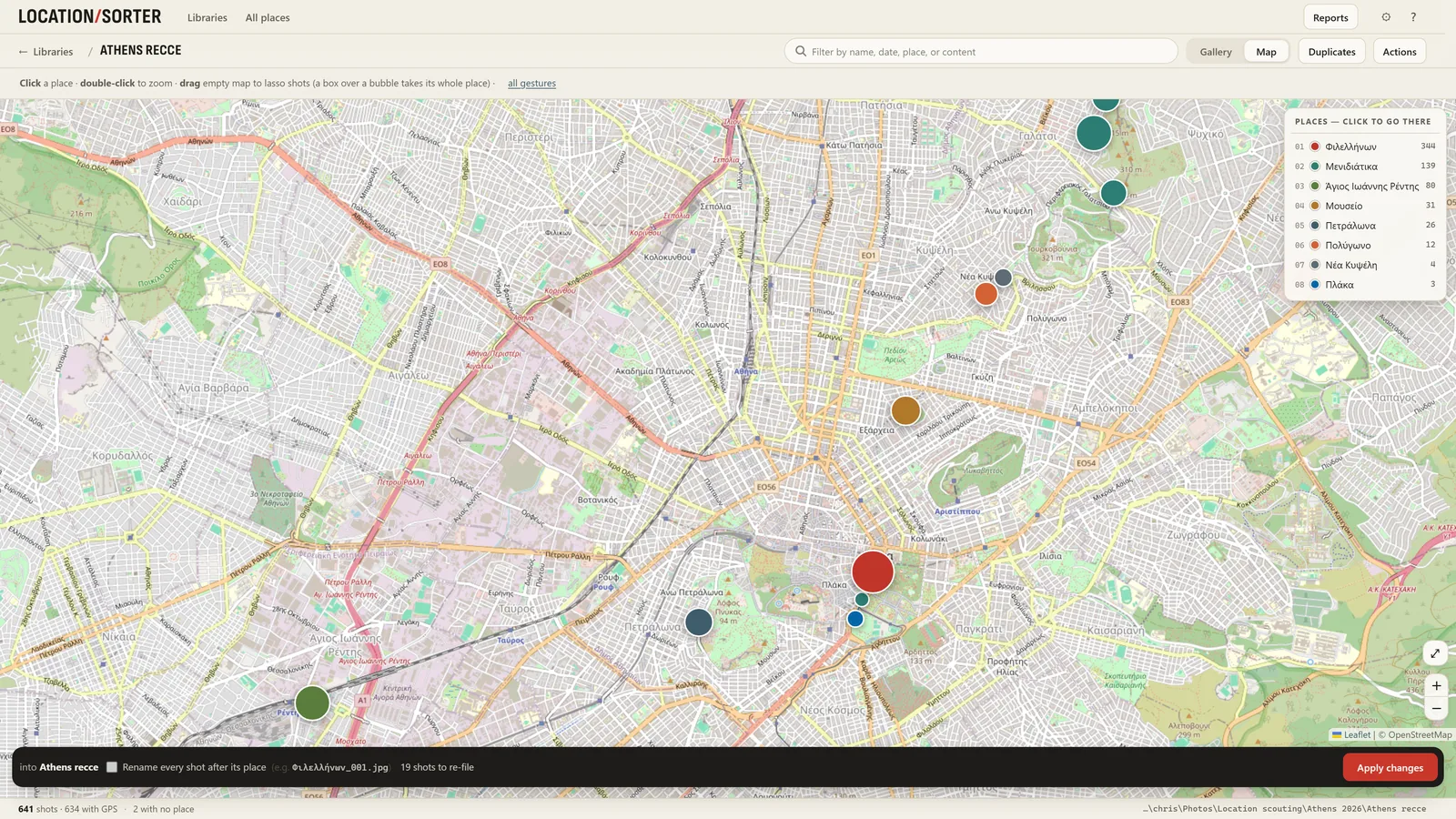
- Choose Sort a folder of shots… and pick the folder you imported into.
- Location Sorter groups the shots taken close together into places and names each one from the map. You see them as pins on a map and as strips of shots.
- Rename places, move a shot to another place with a drag, or lasso a group on the map. Shots without a position (screenshots, saved images, photos taken with location off) go to No place.
- Press Apply. Each place becomes a folder. If anything looks wrong afterwards, Put shots back (in Actions) returns every moved shot to where it came from.
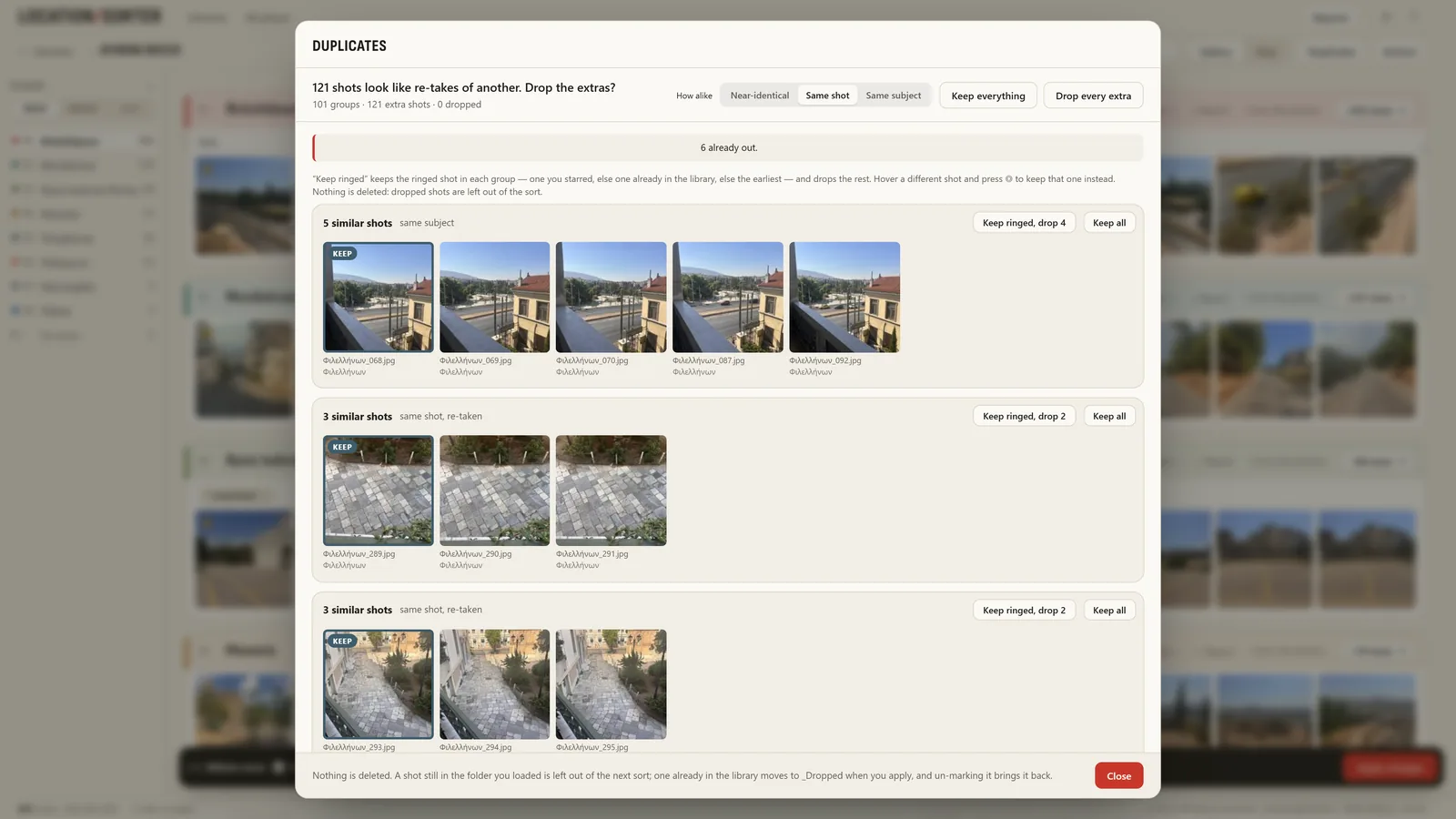
iPhone bursts and repeated takes are common, so Location Sorter also gathers near-duplicates side by side. Keep the best of each and leave the rest out of the sort. It never deletes anything.
If your iPhone photos sync to your PC through iCloud, OneDrive, Dropbox or Google Drive, you can sort straight from that folder.
Keep it tidy next time
- Import a trip at a time into its own folder. Sorting is easier when one folder means one trip.
- Add to an existing sort. Location Sorter remembers each sorted folder as a library. When you import more photos from the same trip, add them and they join the places you already have.
- Back up after sorting. Once the folders look right, that's the moment to copy them to a backup drive or cloud storage.
Location Sorter is free to try for 7 days, with every feature, from the Microsoft Store. After that it is €24.99, once.